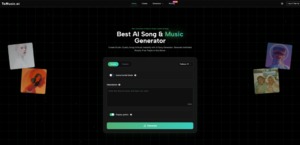
A lot of people approach AI music tools as if the only question is quality. In practice, the harder question is fit: fit for your goal, your timeframe, your skill level, and your tolerance for iteration. When I tested ToMusic, the main difference I noticed was not simply whether it could generate tracks, but how quickly it helped narrow decisions that usually slow creators down.
If you are evaluating an AI Music Generator, it helps to stop asking “Can it make music?” and start asking “What kind of creative decision does it make easier for me today?” That framing immediately makes the platform more understandable, especially if you are not a trained producer.
Start With The Decision You Actually Need
Most users are not choosing between “music” and “no music.” They are choosing between:
- a fast draft and a controlled draft
- instrumental and vocal output
- broad prompting and detailed lyric structure
- one-off usage and repeatable workflow
ToMusic is easier to use when you decide this first. The product supports text prompts and custom lyrics, and it also separates simpler generation from more customizable creation paths. That means you can start from your decision type, not from a feature list.
The Platform Works Better When Goal Comes First
A creator making short-form videos has a different success metric than an indie artist testing song concepts. The former may care most about emotional fit and speed. The latter may care more about lyric structure, phrasing control, and repeat revisions.
Because the platform supports both prompt-based generation and lyric-based generation, it can serve both cases, but only if the user chooses a workflow that matches the task.
A Useful First Question Before You Generate Anything
Ask this before the first prompt:
Do I Need A Direction Or A Specific Song Today
If you need a direction, go broad and fast. If you need a specific song, define more structure early and expect more iteration. That single distinction reduces wasted generations.
Understanding The Two Core Creation Paths
The platform experience becomes clearer when you think in terms of exploration mode versus control mode.
Simple Creation Path For Early Exploration
The simpler path is best for speed. You describe the vibe, style, and overall intent, then generate. This works well when you are trying to answer:
- Should this be cinematic or pop?
- Should it feel warm or tense?
- Does this video need vocals at all?
It is a fast way to test assumptions before you invest more attention.
Custom Creation Path For Higher Intent Precision
The custom path becomes more valuable when lyrics are central to the output. ToMusic supports custom lyrics and recognizes common structure tags such as verse, chorus, intro, bridge, and outro markers, which helps shape the song more intentionally.
This matters because many users mistake lyric generation for lyric control. Those are not the same thing. If your wording and structure carry the message, you need a workflow that respects structure.

Why Structure Tags Matter In Practical Use
Structure tags do not make a song automatically better, but they help the system interpret where emphasis and transitions should happen. In my testing, this tends to improve coherence when the lyric content is longer or more narrative.
Model Selection Is Not Just A Technical Option
One of the more practical aspects of the platform is access to multiple model versions. This is useful because creative mismatch often gets blamed on prompting when it may actually be a model-style mismatch.
The site presents several models (V1 to V4), and the broader message is that they differ in capabilities and output behavior. It also notes differences in lyric handling capacity across versions, which is relevant if you plan to work with longer custom lyrics.
A Decision Table For Everyday Use
| Decision Point | Faster Choice | More Controlled Choice | When To Use |
| Starting input | Short text prompt | Full custom lyrics | Idea testing vs song drafting |
| Workflow mode | Simple path | Custom path | Speed vs precision |
| Model strategy | Default first | Compare multiple versions | Quick start vs quality matching |
| Revision style | Prompt tweaks | Prompt + lyric structure edits | Mood mismatch vs structural mismatch |
This table is not about “best settings.” It is about avoiding the wrong workflow for the wrong task.
What Usually Causes Bad First Results
In my experience, disappointing outputs often come from one of three issues:
- the prompt is too vague
- the user expects final quality from a first pass
- the chosen path does not match the task
That is why a tool like Lyrics to Song AI is most useful when treated as a decision accelerator, not a one-click guarantee. It helps you hear options quickly, then move toward the one worth refining.
A Three-Step Official Workflow You Can Repeat
The platform workflow can be kept concise and still produce better outcomes
Three Steps That Match The Product Flow
| Step | Action | Practical Tip |
| 1 | Enter text or custom lyrics and set musical direction | Include genre, mood, tempo, and instrument hints |
| 2 | Choose mode and model version | Start simple for exploration, custom for lyric control |
| 3 | Generate and revise based on mismatch | Change one variable at a time for cleaner comparison |
This stays within the official product logic and avoids adding imaginary steps that are not shown in the platform experience.
Change One Variable Per Retry
If you change mood, tempo, and lyric phrasing all at once, it becomes hard to learn what improved the result. Better iteration usually comes from controlled changes, even when the tool feels fast enough to experiment wildly.
Where The Platform Feels Strongest In Real Use
The strongest use case is not replacing deep production work. It is compressing the early decision cycle:
- identifying the right emotional lane
- testing lyric viability
- generating reference-ready drafts
- building content soundtracks under deadline
The platform also emphasizes customization, length control, and licensing options, which makes it more practical for repeat creators than demo-only tools.
Library And Asset Memory Make Iteration Smarter
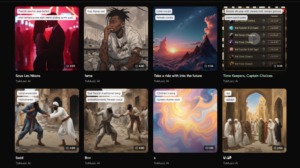
A saved music library with metadata and generation parameters helps turn experiments into reusable starting points. That sounds small until you are producing in batches. Then it becomes a time-saving system.
Reasonable Expectations Lead To Better Results
AI music generation still requires judgment. Results can vary, and some outputs will miss the exact emotional target. Prompt quality matters, model selection matters, and sometimes you simply need another pass.
The good news is that the platform makes retries cheap enough that users can spend more time evaluating creative direction and less time wrestling with setup. That is often the difference between abandoning an idea and finishing it.