Team collaboration breaks down quickly when files live in too many places. One person has the latest version on a laptop, someone else keeps older project folders in a cloud drive, and large assets end up scattered across USB drives and personal desktops. That is why more teams are looking at UGREEN NAS as a practical way to centralize storage, simplify sharing, and keep collaboration moving without losing control of data. UGREEN’s official business solution page frames NASync as a platform for centralized storage, management, security, file synchronization, and team sharing, all aimed at making collaboration more efficient.
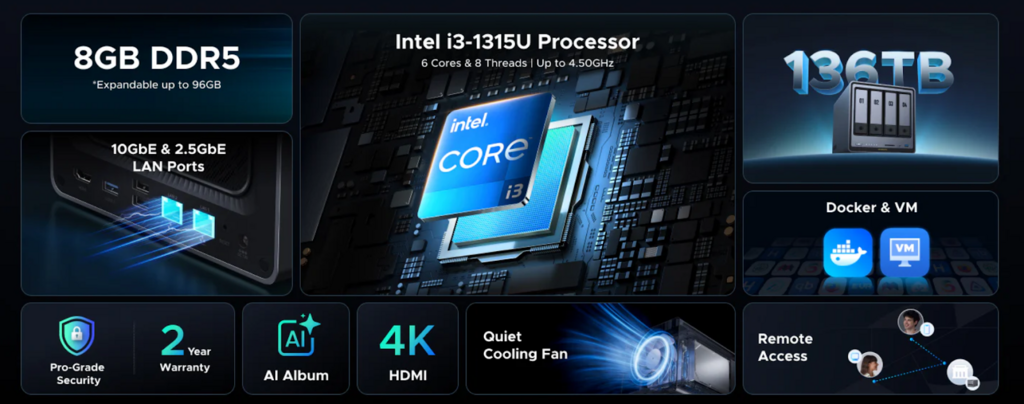
For small teams in particular, the question is not just “Do we need a NAS?” but “What is the best NAS for team collaboration without overbuying?” That is where the UGREEN DXP4800 Pro becomes interesting. UGREEN positions it as a 4-bay NAS with up to 136TB capacity, an Intel Core i3-1315U, dual M.2 NVMe SSD slots, and 10GbE + 2.5GbE networking. On paper, that gives it the kind of headroom that teams need for shared folders, regular backups, multi-user access, and heavier day-to-day workloads.
A NAS built for collaboration should do more than just hold files. It should help teams work from one reliable source of truth. That means centralized storage, user-level permissions, remote access, synchronization across devices, version recovery, and enough performance that file access still feels fast when several people are active at once. UGREEN’s official “NASync for Business” page highlights exactly those needs, including remote automatic backup, historical version recovery, access permission management, sync data across devices, and multi-person file sharing.
That list matters because collaboration is often less about raw capacity and more about workflow reliability. If your team can open the same shared assets from different locations, restore older versions when mistakes happen, and control who can see or edit specific folders, the NAS becomes a collaboration tool rather than just a storage box. UGREEN’s operating system and apps are explicitly built around multi-device access and configurable permissions, which makes the platform relevant for real-world team use rather than just home backup.
Why UGREEN NAS fits modern team workflows
One of the clearest advantages of UGREEN NAS for collaboration is access flexibility. UGREEN says UGOS Pro supports access through web, PC, mobile, tablet, and TV, and the company’s app page says the UGREEN NAS app is designed for storage, backup, synchronization, sharing, app management, and flexible configuration of multi-user permissions. For hybrid teams, that matters: people are no longer working from one desk on one machine. They need to check shared files from laptops, phones, and remote locations without turning every file request into a Slack message.
UGREEN also emphasizes UGREENlink, which it describes as a fast, secure connectivity method that does not require extra configuration for system access. That is especially useful for smaller teams that do not have a dedicated IT admin and want remote access without complex networking work. In practical terms, simpler remote access lowers the friction of collaboration and helps teams adopt the NAS as a daily workspace rather than a device they only touch when something goes wrong.
Why the UGREEN DXP4800 Pro is a strong choice for small teams
The UGREEN DXP4800 Pro is not the biggest NAS in UGREEN’s lineup, but that can actually be an advantage for small teams. It offers four drive bays and support for up to 136TB, which is enough room for many shared business workloads such as design assets, project folders, internal documents, client deliverables, and backup archives. UGREEN also says the DXP4800 Pro can store tens of millions of photos or tens of thousands of movies, which signals that it is built for high-volume content libraries rather than just office documents.
Performance is where the UGREEN DXP4800 Pro becomes more than just “enough.” UGREEN lists an Intel Core i3-1315U and says it can handle demanding concurrent tasks such as Docker containers, virtual machines, file sync, and media transcoding. For collaboration-focused teams, that means the device has room to do more than basic file serving. A small creative agency could use it for shared storage and previews. A distributed operations team could run sync jobs and backups at the same time. A startup could use shared folders now and layer in containers or workflow tools later. That flexibility is an inference from the processor and the workloads UGREEN says the unit supports.
The networking story is also compelling. The DXP4800 Pro includes 10GbE + 2.5GbE ports, and UGREEN says the 10GbE connection is there for high-speed networking when available while 2.5GbE supports smooth performance on common networks. For team collaboration, that is important because slow transfer speeds do not just waste time; they interrupt momentum. Large presentations, media files, CAD assets, or shared backup jobs can bottleneck a weaker NAS very quickly. Faster built-in networking gives the DXP4800 Pro a stronger case for teams that expect their file volumes to grow.
Collaboration is not just about speed — it is also about control
Storage performance gets attention, but collaboration depends just as much on governance. UGREEN’s official materials stress advanced protection, flexible permissions, and a Security Manager with real-time virus monitoring and file scanning. The business page also highlights access permission management and historical version recovery, which are critical for shared environments where multiple people touch the same files.
That combination is useful for teams that need private cloud benefits without giving up oversight. A shared NAS can provide one workspace for the team while still separating private departments, client folders, or leadership-only documents. And if a file is deleted, overwritten, or infected, having backup and version recovery features reduces the risk that one mistake becomes a bigger operational problem.
Is the DXP4800 Pro the best NAS for every team?
Not for every team. UGREEN’s own business solution page showcases higher-end 6-bay and 8-bay models for enterprise-oriented scenarios, which suggests that larger organizations with heavier concurrent workloads, more users, or larger datasets may want more bays and expansion headroom than a 4-bay model provides.
But that does not weaken the case for the UGREEN DXP4800 Pro. It clarifies it. The DXP4800 Pro makes the most sense for small teams, startups, studios, and departments that want centralized collaboration, fast networking, multi-user permissions, remote access, and room to scale without jumping immediately into a larger enterprise chassis. In that segment, it looks like a very balanced option: powerful enough to feel future-ready, but still compact and approachable. That is an evaluative conclusion based on UGREEN’s published specs and collaboration features.
Final verdict
If you are looking for the best NAS for team collaboration, the strongest answer is not simply “the biggest NAS.” It is the one that brings together centralized storage, user permissions, remote access, sync, security, and enough performance to keep everyday teamwork fluid. UGREEN NAS checks those boxes with its business-focused collaboration features, multi-device access, and permission controls.
For small and growing teams, the UGREEN DXP4800 Pro stands out as one of the most interesting options because it pairs collaboration-friendly software features with stronger hardware than many teams expect from a 4-bay NAS: Intel Core i3-1315U, dual M.2 NVMe, 10GbE + 2.5GbE, and support for up to 136TB. If your goal is to create a shared workspace that is fast, secure, and easier to manage than scattered cloud folders and external drives, the UGREEN DXP4800 Pro is a very credible place to start.