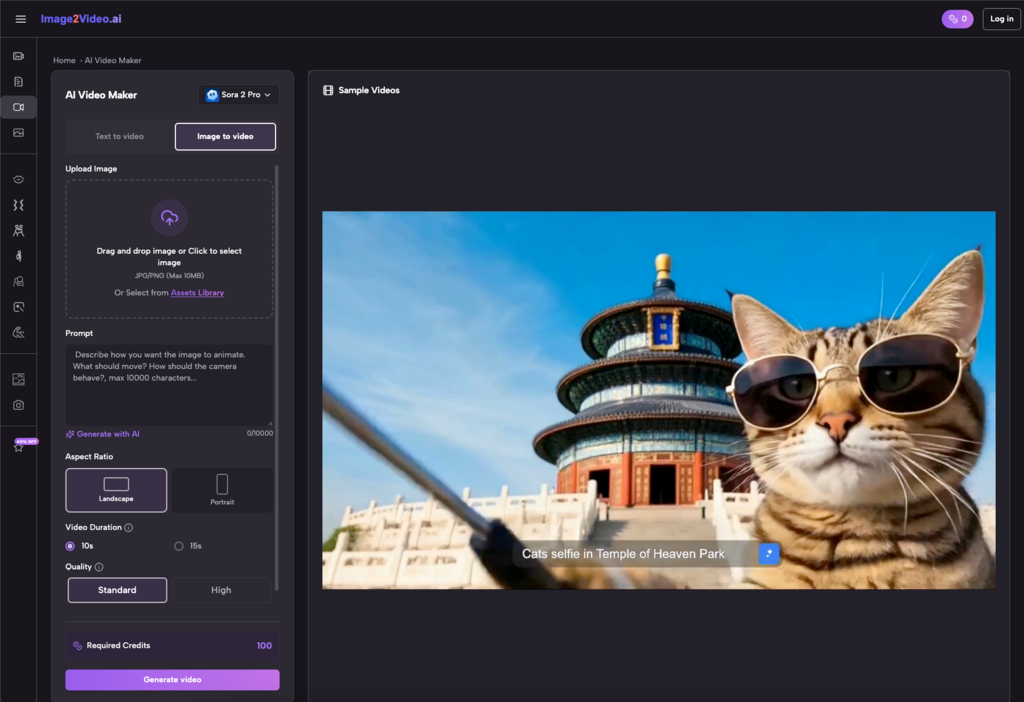
For most social media managers accustomed to tightly controlling static graphics, the first encounter with dynamic generation tools is a mix of high hopes and deep skepticism. You likely have hard drives full of beautiful product shots, event photography, and visual assets, while platform algorithms relentlessly demand more video content. So, you open a free online generator, looking for a shortcut to feed the content machine.
When people first use an Image to Video tool, the most common source of frustration is the sudden, jarring loss of control.
You upload a carefully color-graded photo of a coffee cup on a cafe table, expecting a cinematic, beautifully lit micro-movie where steam gently rises from the surface. Instead, the first output might feature a warped ceramic rim, a background that slides without any physical logic, or a bizarre melting effect on the table itself. This gap between expectation and reality is the growing pain every beginner experiences.
During my first few months exploring these platforms, I frequently fell into a specific trap: trying to push the limits of the AI with incredibly complex, busy photographs. I quickly realized that these tools aren’t designed to take over the jobs of a director, cinematographer, and editor all at once. They exist to inject a plausible sense of motion into pixels that would otherwise sit flat on a screen. Once you understand that limitation, your patience for the process increases dramatically, and you can start using the technology for what it actually is.
Why Photo to Video AI is an Amplifier, Not a Magician
There is a pervasive myth in the digital marketing space that as long as the algorithm is advanced enough, even a poorly composed, badly lit throwaway shot can be rescued and turned into high-quality video. This is perhaps the biggest misunderstanding surrounding current generative workflows.
In reality, Photo to Video AI acts much more like a visual amplifier. It will enhance the strengths of your original image, but it will also ruthlessly expose and amplify its logical flaws.
If your source image has a clearly defined depth of field, a distinct foreground subject, and layered lighting, the AI has an easier time analyzing those elements. It can accurately judge which parts of the frame should remain anchored and which should shift to simulate a camera pan or environmental movement.
Conversely, if you feed it a flat, cluttered 2D illustration or a photo with terrible contrast, the system often gets confused. Without clear spatial cues, it resorts to a dizzying, global panning effect that makes the viewer seasick, or it simply morphs the pixels in a way that looks like a bad psychedelic filter.
Through trial and error, you are essentially learning how to see photographs through the eyes of the machine. You start asking yourself different questions when selecting assets from your company’s media library:
Where are the natural leading lines in this composition?
Does the frame contain implied motion, like hair catching a breeze, a vehicle on a road, or water mid-pour?
Is there enough visual separation between the foreground subject and the background environment?
When you begin filtering your assets through these specific questions, you notice that Image to Video AI genuinely increases the final output quality. You aren’t just getting lucky; you are providing the system with a solid, mathematically readable foundation for its animation calculations.
Redefining the Workflow: From “Getting Lucky” to Strategic Generation
Once you abandon the fantasy of the perfect “one-click masterpiece,” the truly practical workflow begins. For social media teams and solo creators, time is the ultimate currency. If you spend an entire afternoon repeatedly rolling the dice on a free picture to video converter hoping for a miracle, the tool ceases to be efficient.
Experienced users don’t rely on a single click. They treat the process as a form of rapid visual prototyping.
Beginner Workflow (Slot Machine)
Mature Workflow (Strategic)
Core Difference
Uploading a random image without analyzing depth or composition
Filtering archives specifically for clear depth and motion potential
Asset evaluation skills
Expecting a flawless, ready-to-publish result on the first try
Treating the first output as a rough baseline for iteration
Expectation management
Abandoning the tool entirely after one weird, distorted failure
Diagnosing the error, cropping the image, and testing again
Understanding AI logic
In practice, transforming a static photo into a dynamic video is a loop of filtering, generating, evaluating, and repurposing. Often, you only need two or three seconds of subtle movement—perhaps the drifting of clouds in a real estate photo, or the shimmer of light on a new product packaging.
That brief moment of motion is usually enough to break the “static fatigue” in an Instagram or TikTok feed and grab a scroller’s attention. You don’t need feature-film perfection. You need visual stimuli that are just dynamic enough to stop the thumb. This is where a free Photo to Video converter proves its actual worth in the trenches of daily content operations.
The True Boundaries of Free Converters in Daily Production
When budgets are tight or you need to react to a trending topic within hours, having immediate access to a free online generator is incredibly empowering for small e-commerce teams. But we have to be honest about the boundaries of the technology to avoid workflow bottlenecks.
Right now, it likely won’t generate a complex, 60-second narrative commercial from a single prompt. Its true strength lies in the creation of “micro-motion.”
Think about transforming a static e-commerce product poster into a breathing, dynamic banner ad. Or taking a folder of excellent, high-resolution event photography from last year’s conference and repackaging it as a b-roll sequence with synthetic camera movements to promote this year’s ticket sales.
At this level, Image to Video technology offers a remarkably low-cost way to revive dormant assets. You no longer need to rent a studio or buy expensive stock footage just to get a three-second transition shot for a YouTube intro. You can extract entirely new value directly from the archives you already own, stretching your initial production budgets much further.
Finding Your Rhythm in Asset Repurposing
As you become more familiar with the quirks and temperaments of these platforms, a psychological shift happens. You stop obsessing over the occasional artifact or weird glitch in the background, and you start focusing on how seamlessly the tool fits into your broader content supply chain.
The goal isn’t to replace your videographers or motion designers. The goal is to fill the gaps in your content calendar with engaging, low-lift visuals that keep your audience engaged between major campaign launches. When you approach Photo to Video AI as a daily utility rather than a futuristic novelty, the friction disappears.
You begin to enjoy the process of waking up old static assets. You learn which types of photos yield the best animations, how to crop for better focal points before uploading, and when a subtle zoom is more effective than a complex pan. Over time, through continuous, low-budget experimentation, you find a dynamic visual rhythm that works specifically for your brand’s aesthetic and your team’s bandwidth.