Losing or damaging an iPhone charger is inconvenient, but replacing it should not mean buying the first adapter that fits. The right replacement needs to match your iPhone connector, charging requirements and everyday routine.
For some users, a compact single-port charger is all they need. Others may benefit from a multi-port GaN charger that can share power between a phone, tablet and laptop. Travel chargers and wireless charging can also make sense in specific situations.
This guide explains how to identify what has failed, choose the right charging format and avoid paying for features you are unlikely to use.
Step 1: Check What Has Actually Failed
Before replacing the entire charging setup, identify whether the problem comes from the cable, power adapter or iPhone itself.
A quick check can include:
- Inspect the cable: Look for fraying, damaged insulation or bent connectors.
- Try another compatible cable or charger: This can help identify which accessory is causing the problem.
- Test another mains socket: A charger may appear faulty when the power source is actually the issue.
- Check the charging port: Visible lint or debris can prevent the connector from seating properly.
- Avoid forcing objects into the port: Follow Apple’s cleaning guidance or seek professional support if the connector appears blocked or damaged.
If a known-working charger and cable still do not charge the phone, the issue may be with the iPhone rather than the accessories.
Step 2: Match the Cable to Your iPhone
The next step is physical compatibility.
- iPhone 15 and later: Use USB-C for wired charging.
- Earlier iPhones with Lightning: Use the appropriate Lightning cable, with USB-C to Lightning being a practical option for USB-C PD fast charging.
- Much older iPhones: Check the exact connector before buying, as models from before Lightning use an older interface.
Do not assume every USB-C cable performs the same way. Cables can differ in supported charging power and data speed even when the connectors look identical.
For most current charging setups, USB-C Power Delivery provides the most flexible starting point.
Choose a Charger Around Your Daily Routine
Rather than choosing by wattage alone, start with how many devices you charge and where you normally use them.
For Everyday iPhone Charging
If you mainly charge one iPhone at home, a compact single-port USB-C PD charger is usually the simplest option.
For many recent iPhones, around 20 W or above is a practical starting point for faster wired charging. Some newer models can take advantage of higher-output adapters under supported conditions, but buying more wattage does not automatically make every iPhone charge faster.
For a bedside table, kitchen socket or small desk, simplicity may matter more than maximum output.
For Commuters and Frequent Travellers
Portability becomes more important if the charger moves between home, work and luggage.
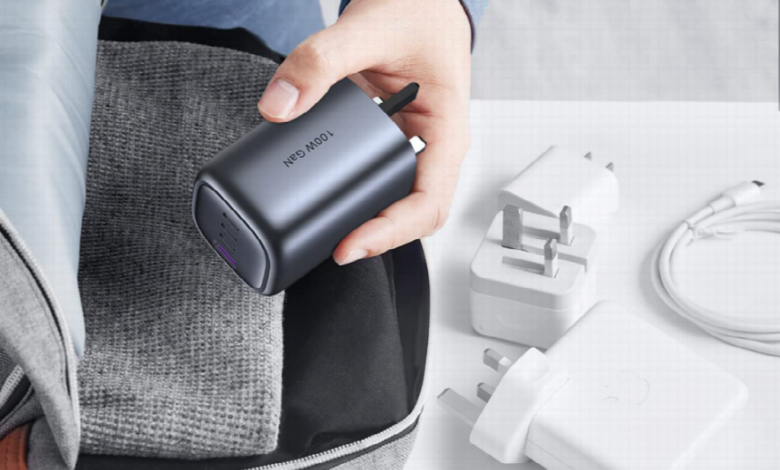
GaN chargers are useful here because the technology allows relatively high charging output in a more compact design. Folding plug designs can also reduce bulk when the charger is stored in a laptop bag or travel pouch.
For international travel, chargers with interchangeable plug options can reduce the number of separate adapters needed when moving between destinations that use different socket types.
Always check input voltage and local socket requirements before travelling rather than assuming one adapter works everywhere.
For People With Several Devices
If your daily setup includes an iPhone, tablet, earbuds and a USB-C laptop, a multi-port charger can be more practical than several individual adapters.
Multi-port charging can provide a few clear benefits:
- Fewer adapters taking up wall sockets
- Less cable and charger clutter
- One charging setup for several compatible devices
- Easier packing for commuting and travel
Some multi-port chargers also distribute available power automatically between connected devices. The important point is to check how much power each port can provide when several devices are charging at the same time.
For users replacing an old or lost adapter, browsing a wider iphone charger range can make it easier to choose between single-port, multi-port, travel and wireless charging formats rather than simply replacing like for like.
Why GaN Matters in a Replacement Charger
GaN, or Gallium Nitride, is increasingly used in modern USB-C chargers because it can support high power levels in a smaller physical design.
For everyday users, the main benefits are practical rather than technical:
- A smaller charger at a comparable power level
- Less bulk in a commuter or travel bag
- Higher-output options without a large traditional power brick
- Multi-port charging in a more compact format
- Better use of desk and socket space
GaN does not automatically make every charger better. Port layout, power distribution, thermal design and device compatibility still matter.
That is why wattage should always be connected to a real use case.
Do You Need 20 W, 45 W, 65 W or 100 W?
The highest wattage is not automatically the best choice.
Think about what else the charger needs to power.
- Around 20 W: A practical starting point for users mainly charging an iPhone.
- Around 45 W: Adds more headroom for compatible tablets and other USB-C devices.
- Around 65 W: More useful when the same charger also needs to power many USB-C laptops.
- Around 100 W: Better suited to higher-power laptops or multi-device setups that need more total charging capacity.
A 65 W or 100 W charger does not force that full amount of power into an iPhone. With compatible USB Power Delivery equipment, the charger and device negotiate a supported power level.
For multi-port models, check power distribution carefully. A charger rated for 100 W in total does not necessarily provide 100 W from every port when several devices are connected.
USB-C PD: What iPhone Users Actually Need to Know
USB Power Delivery is a widely used charging standard that allows compatible chargers and devices to negotiate power.
For most users, three points matter:
- Higher charger wattage does not automatically mean faster iPhone charging.
- A higher-output PD charger may also be useful for tablets, laptops and other compatible devices.
- Charging speed can change with battery level, temperature, device use and charging settings.
The iPhone manages its own battery and thermal conditions. It may reduce or pause charging when appropriate rather than accepting the charger’s maximum rated output continuously.
This is why compatibility and build quality matter more than simply choosing the largest wattage printed on the box.
When Multi-Port Charging Is Worth It
A multi-port charger makes the most sense when the same socket regularly serves more than one device.
A remote worker might charge an iPhone and laptop from one adapter. A student may need a phone, tablet and earbuds ready for the next day. A traveller may prefer one compact charger instead of several separate plugs.
Power is shared between active ports, so multi-port models should be compared by their power distribution rather than total wattage alone.
For this type of setup, a higher-output usb c charger can provide more flexibility than an iPhone-only adapter, particularly when tablets or laptops are also part of the daily kit.
Consider Qi2 for Desk and Bedside Charging
Not every replacement needs to be another wired charger.
Qi2 magnetic wireless charging can work well on a desk, bedside table or other fixed charging location. Magnetic alignment helps position a compatible phone correctly on the charging surface, making it easier to place the device consistently.
Qi2 accessories can support magnetic charging at up to 15 W on compatible setups. Actual charging performance depends on the iPhone, charger, power adapter, case, temperature and other conditions.
The main benefit is convenience rather than maximum charging speed.
A wired USB-C PD charger remains the more flexible choice when speed, portability or cross-device charging matters. Magnetic wireless charging makes more sense when the phone regularly charges in the same place and easy alignment is the priority.
Check Safety and Plug Requirements
Electrical safety matters as much as charging speed.
When buying a replacement charger, check for:
- Appropriate conformity information for the market where it is sold
- A plug designed for the local socket standard
- Clear manufacturer and electrical ratings
- Suitable USB-C PD specifications
- Protection information such as over-temperature, over-voltage or short-circuit protection where specified
- A reputable retailer or manufacturer
For chargers sold in Great Britain, the appropriate UKCA or CE marking may be used where permitted under the applicable rules, and UK plug designs should be suitable for BS 1363 socket outlets.
A charger’s weight alone is not a reliable way to judge quality. Modern GaN chargers can deliver relatively high power from compact housings, so specifications, conformity information and manufacturer traceability are more useful indicators.
Common Replacement Charger Mistakes
Avoid a few common shortcuts when shopping:
- Do not assume all USB-C cables support the same charging power.
- Do not buy 100 W simply because it sounds faster than 20 W.
- Do not assume every port on a multi-port charger provides the charger’s full rated wattage.
- Do not assume a travel plug works in every country.
- Do not judge charger quality by weight alone.
- Do not assume wireless charging is automatically faster than wired USB-C PD.
- Do not pay for several ports or very high output if you only charge one phone.
A good replacement is the one that matches the devices and situations you use most often.
Conclusion: Match the Charger to the Way You Use Your Devices
Replacing a lost or damaged iPhone charger becomes much easier once you separate connector type, charging power and daily use.
For simple home charging, a compact USB-C PD adapter may be enough. Commuters can benefit from smaller GaN designs, while frequent travellers may prefer folding or interchangeable plug options. Multi-device users can consider 65 W or 100 W-class chargers, while Qi2 provides another convenient option for fixed desk or bedside charging.
The best replacement is not necessarily the most powerful one. Choose the wattage, number of ports and charging format that fit your devices and routine, and the new charger can be more useful than the one it replaces.