An employee who needs a work file at nine in the evening has a different problem from someone waiting for an IT technician to fix a laptop. The first person needs reliable access to a desktop, application or company system that is normally accessed from the workplace. The same issue arises when staff split their time between offices, homes and other locations.
For smaller businesses, the practical question is how to provide that access without recreating the entire office environment on every device. The answer depends on what employees need to open, where the software is hosted and how the business wants users to connect.
Start With What Employees Need to Reach After Hours
Some employees need a complete work desktop because their files, shortcuts and applications are tied to that environment. Others only need one or two business applications hosted on a company server. Treating those situations as identical can lead to a larger setup than the organisation requires.
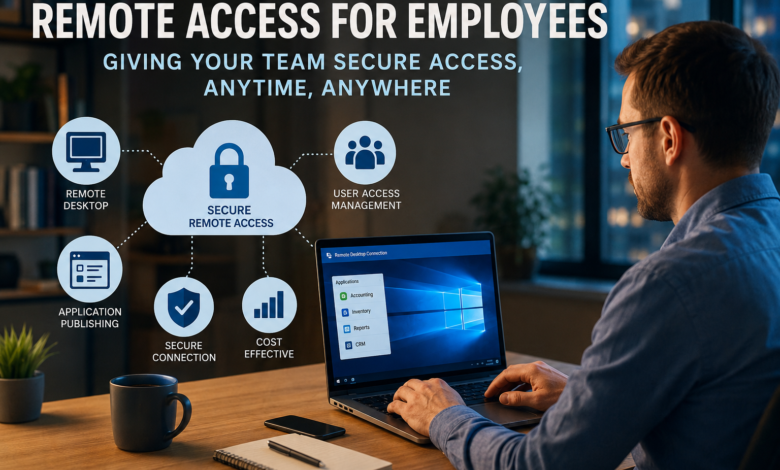
When employees need ongoing access to their work desktop or server-hosted applications after hours, remote access tools only fit the requirement if they provide remote desktop access and application delivery rather than one-off technician control. The connection should let staff return to the applications and working environment they already use without recreating that setup on another device.
This distinction also helps IT teams avoid mixing two different requirements. Technical support software is designed around assistance and control of another person’s computer. Remote access software gives authorised users ongoing access to desktops, applications and resources hosted elsewhere.
The buying decision becomes clearer once the business lists which employees need access, what they need to open and how frequently they work away from the main office.
Older Business Applications Do Not Always Need Replacing
A move towards flexible working sometimes exposes a problem that was easy to ignore when everyone worked in one building. An accounting, stock management or operational application may still work perfectly well, but only on machines connected to the office environment.
Replacing a useful application solely because employees need access from elsewhere can become a much larger project than expected. Another option is to host the Windows application centrally and make it available to authorised remote users.
Application publishing offers another route. Instead of installing the same software separately on every employee computer, the application remains on the business server and users connect to it remotely. Depending on the setup, staff may receive the application itself rather than a complete Windows desktop.
TSplus Remote Access supports both remote desktop access and Windows application publishing. For a company with established software that still meets its operational needs, this model gives IT teams another route to remote working without requiring the application itself to be redesigned.
Browser Access Changes the Setup for Remote Users
Dedicated remote desktop software is useful when a business wants a familiar connection method on managed computers. It is not the only way employees need to connect.
Browser access matters when staff move between devices or work from locations where installing additional client software is inconvenient. An HTML5 web portal gives users access to a remote desktop or published applications inside a standard browser. The business still needs to configure the server and user access correctly, but there is less software to prepare on the employee’s device.
The choice between an RDP client, a dedicated connection tool and browser access should follow the working pattern. A member of staff using the same company laptop every day has different needs from a manager who occasionally opens a business application away from the office.
Before a wider rollout, a small pilot helps expose practical problems. IT teams can check browser compatibility, login behaviour, application display, printing requirements and whether employees understand which connection method they should use.
User Access Should Follow the Job Rather Than the Device
Remote access becomes difficult to manage when every user receives the same permissions. An employee who only needs one application does not necessarily need a complete remote desktop, while another role may depend on several applications and shared files.
Assigning access rights around actual job requirements keeps the setup easier to understand. IT administrators should know which users or groups receive each application, who needs a complete desktop and which accounts should lose access after a role change or departure.
This matters particularly when remote access expands gradually. A system that begins with five employees may later cover several departments. Permissions that made sense during the first rollout are easy to overlook once more accounts and applications have been added.
Authentication and connection security also belong in the deployment plan. Businesses should review the protection available with the chosen edition and connection method rather than assume every security feature is included by default. Optional controls should be assessed separately where the organisation requires them.
Remote Access Costs Depend on the Way People Work
Licence price is only one part of wider technology costs. Server requirements, administration, user numbers and the amount of support required after deployment also affect what the business spends.
The number of simultaneous users deserves particular attention. A company may employ fifty people while only ten need remote access at the same time. Another organisation may have a smaller workforce but expect almost everyone to connect during the same working hours.
Those patterns affect how a remote access environment should be planned. The same applies to growth. Adding another team, application or server later may change both infrastructure and licensing requirements.
Finance and IT need to work from the same usage assumptions before evaluating remote desktop software. A realistic estimate should cover the number of users, likely concurrent sessions, applications being delivered and any additional support or security requirements. That gives the business a more useful cost picture than the licence price on its own.
Choose the Access Model Before Choosing the Feature List
The employee’s actual task is a better starting point for a remote access project than the length of a feature list. Someone who needs a single accounting application after hours does not have the same requirement as a user who works inside a full Windows desktop for most of the week.
Mapping those situations first makes technology choices easier. IT teams can decide which applications remain on central servers, which users need full desktops, whether browser access matters and how accounts will be managed as staff roles change.
A long feature list does little if the everyday connection process becomes difficult for employees or creates unnecessary work for IT. The better remote access setup is the one that fits the applications already in use, gives the right people the access they need and remains manageable as working patterns change.
For businesses that still depend on centrally hosted Windows software, remote desktop and application publishing can extend access without forcing an immediate replacement of applications that still serve the business. The final setup should reflect what employees need to open, how often they connect and how much administration the IT team can manage.